Polystro logoPolystro
FeaturesPricingDocsCompare
Log inSign up

Docs

Desktop product docs, organized as a docs tree instead of a marketing page.

Need full docs search? Use Cmd+K or Ctrl+K.

Getting Started

Overview

Installation

CLI Setup and Auth

Core Concepts

Workstreams and Isolation

Browser and Services

Worktree Modes

Workflows

Agent Workflows

Sessions and Layout

Planning and Ideation

Review and Merge

Search and Shortcuts

Imported History and Project Actions

Operations

Services and Previews

Environment and Routing

Automation and Remote Access

Scripts vs Automations

Command Routing and Slash Commands

Local Viewer

Settings and Integrations

Updates, Licensing, and Support

Troubleshooting Index

Permissions and Safety

HomeDocsWorkflowsAgent Workflows
Workflows

Sessions, planning, review, and merge live in one shell.

Polystro lets you supervise several kinds of work without leaving the desktop surface: direct coding sessions, structured planning, staged ideation, reviewer agents, diff acceptance, and merge preparation.

Sessions and Tabs

Sessions are grouped by CLI in the left sidebar, and you can open several active tabs across different CLIs at once. That makes Polystro useful both for one main agent and for side-by-side supervision.

The sidebar is not only a history list. It shows active state, unread state, archived sessions, and imported CLI histories, so the workstream keeps a persistent record of the conversations around it.

The Conversation Surface

The composer supports more than plain text prompts. You can attach files and images, mention files with @, use Polystro slash commands, or pass raw slash commands through to the active CLI.

Footer controls let you switch model, reasoning mode, workspace target, branch/worktree behavior, and permission mode from the same session surface. Inline permission cards and user-question cards keep interruptions inside the transcript instead of kicking you to a separate dialog.

Why the composer matters

Polystro is opinionated about keeping control surfaces near the conversation instead of scattering them across separate modal tools.

Plan Mode

Plan Mode is for structured implementation planning before build work starts. A conversation can switch into plan mode, generate a structured draft, and then let you revise, approve, reject, or open the markdown artifact directly.

Once approved, the plan can launch implementation in the current session or hand off into a new session or CLI. This makes planning a real stage in the workflow rather than an informal wall of chat text.

Ideation Center

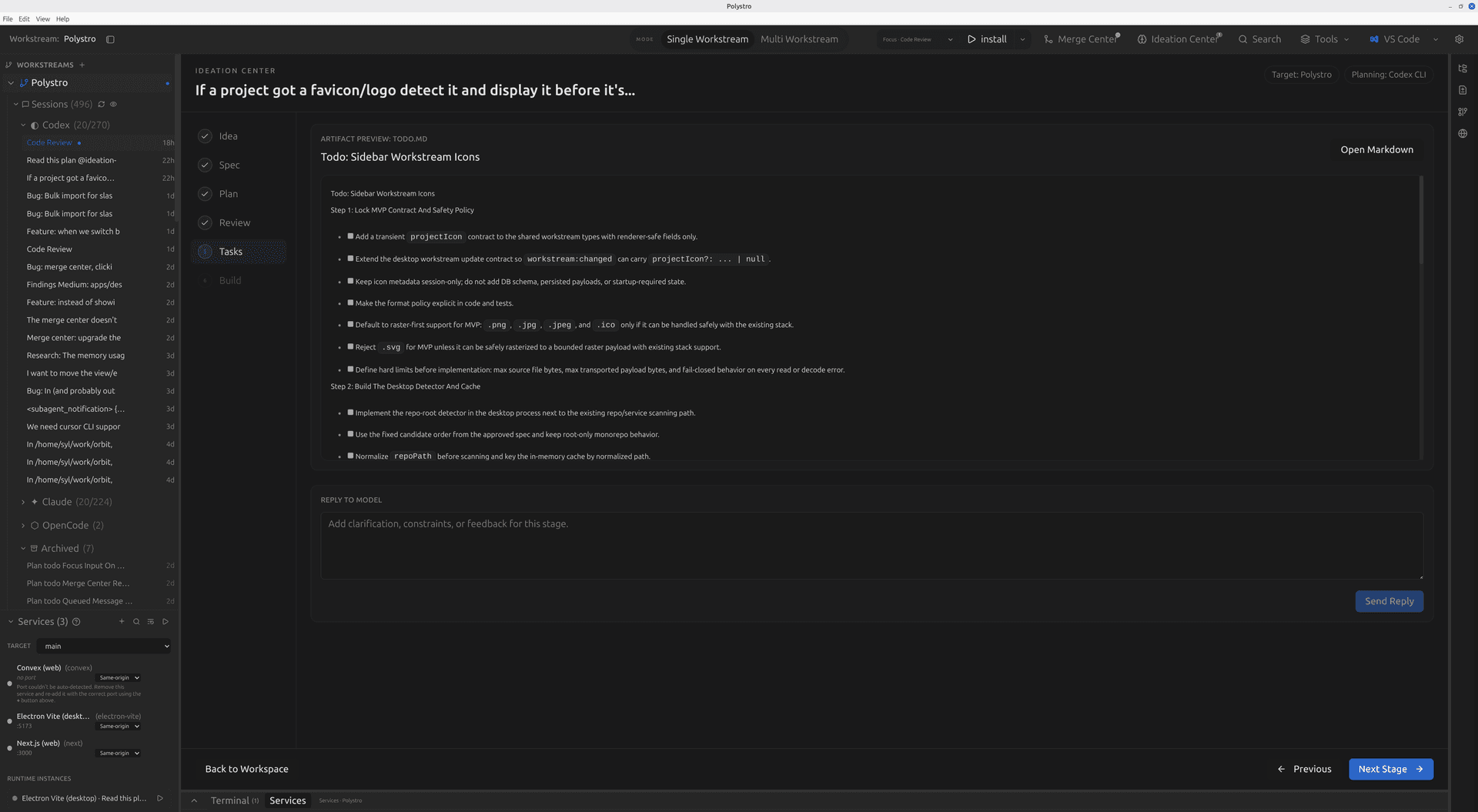
Ideation Center is the broader staged flow for shaping work before it becomes implementation. It walks through idea, spec, plan, review, tasks, and build stages, then hands off into an execution session.
Product Surface
Polystro ideation center
Ideation Center is designed as a multi-stage product-thinking flow, not just another chat transcript. The output can then be handed into build work inside the same desktop shell.

Review and Merge

When agent work produces changes, Polystro can spawn reviewer agents, open file-by-file and hunk-by-hunk review, accept or reject changes, resolve conflicts, and prepare merge or PR flows from Merge Center.

Reviewer agents

Spin up a dedicated reviewer tab for an isolated workspace without breaking the main build session.

Hunk decisions

Accept or reject at the hunk or file level rather than taking the whole diff blindly.

Open in editor

Jump out to your chosen editor from review when the right move is local inspection or manual resolution.

Merge Center

Use one central surface to inspect isolated workspaces, conflicts, and follow-on merge actions.

Search and Navigation

The search dialog works like a command palette for the whole shell. From one place you can search files, branch names, workstreams, sessions, and session content, then jump directly to the right place.

On top of that, keybindings and fixed session shortcuts help frequent users move across tabs and workstreams without reaching for the mouse every time.

Go deeper on sessions and layout

See how the sidebar, tabs, docked panes, terminals, and workspace modes support parallel supervision.

Go deeper on planning and ideation

Learn how Plan Mode and Ideation Center structure work before implementation starts.

Go deeper on review and merge

Understand reviewer agents, diff acceptance, and Merge Center in more detail.

Continue to automations and remote access

See how scripts, scheduled runs, slash-command workflows, and the local viewer extend the desktop shell.

Previous

Worktree Modes

When to use direct mode versus isolated worktree mode and how that choice changes agent execution.

Next

Sessions and Layout

Sidebar history, agent tabs, panes, docked conversations, terminals, and workspace modes.

On This Page

Sessions and TabsConversation SurfacePlan ModeIdeation CenterReview and MergeSearch and Navigation
Polystro logoPolystro

The desktop app for running parallel agents without port, browser, or git collisions.

Product

  • Features
  • Pricing

Resources

  • Docs
  • Compare

Company

  • Privacy
  • Terms

© 2026 Polystro. All rights reserved.

Built for multi-agent software development on desktop.