Documentation for the desktop workstream shell.
Polystro is built around one idea: a workstream should carry its browser state, routes, services, terminals, sessions, and git isolation with it. These docs explain that model first, then the features that fall out of it.
What Polystro Is
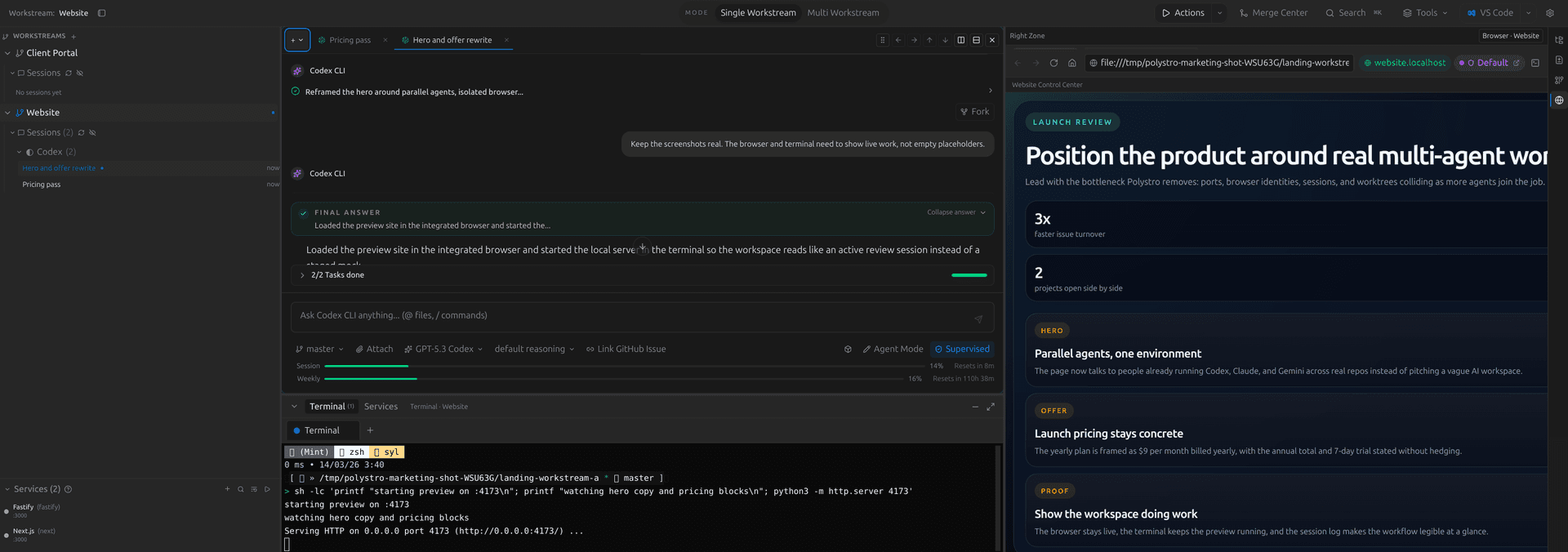
Polystro is not only a chat surface for coding agents. It is a desktop environment for running multiple agents across real repos without letting ports, browser sessions, terminal context, or worktrees drift apart.
Workstream-first
Each repo-backed workstream keeps its own sessions, browser identities, routed previews, and runtime state.
Desktop-native
The browser, terminal, services, merge review, and agent sessions live in one shell instead of being stitched together by hand.
Parallel by default
Agent sessions can run side by side, and isolated worktrees keep concurrent work from colliding in the same repo state.
Bring your own tools
Polystro works with the agent CLIs and provider accounts you already use rather than forcing an internal credit layer.
How To Read These Docs
Start with installation if you want to get the app running. Start with workstreams and isolation if you are evaluating whether Polystro matches your workflow. The later pages explain higher-level workflows like planning, ideation, review, automation, and remote continuation.
Browse The Docs
Use the directory below to scan every page in the docs section. The directory is searchable, so it can double as a lightweight docs search when you already know roughly what topic you need.
Getting Started
Core Concepts
Workstreams and Isolation
How routing, browser identities, terminals, and worktrees stay attached.
Browser and Services
Integrated browser behavior, local previews, routed services, and the runtime shell.
Worktree Modes
When to use direct mode versus isolated worktree mode and how that choice changes agent execution.
Workflows
Agent Workflows
Sessions, planning, ideation, review, and merge flows.
Sessions and Layout
Sidebar history, agent tabs, panes, docked conversations, terminals, and workspace modes.
Planning and Ideation
Plan Mode, structured approval loops, ideation stages, and build handoff.
Review and Merge
Reviewer agents, diff acceptance, Merge Center, and isolated workspace review.
Search and Shortcuts
Command palette prefixes, session navigation, keybindings, and fast movement across the shell.
Imported History and Project Actions
Bring external CLI history into the workstream and automate repeatable project commands.
Operations
Services and Previews
Scan services, start them in the right order, read logs, and work with routed previews.
Environment and Routing
Inspect resolved variables, manage overrides, compare environment diffs, and debug routed hostnames across workstreams.
Automation and Remote Access
Scripts, scheduled runs, slash-command workflows, and the local viewer.
Scripts vs Automations
Choose between shell scripts, slash-command workflows, and scheduled automations.
Command Routing and Slash Commands
Create custom commands, import prompt files, route commands to models, and test routing policies.
Local Viewer
Loopback and LAN viewing, QR or link-and-PIN pairing, trusted devices, and away-from-desk continuation.
Settings and Integrations
General behavior, browser/layout settings, CLIs, MCP, skills, voice, notifications, and keybindings.
Updates, Licensing, and Support
Update checks, release notes, bug reports, device limits, license recovery, and account actions.
Troubleshooting Index
Start from the symptom and route yourself to the right Polystro surface instead of debugging the wrong layer.
Permissions and Safety
Supervised execution, permission prompts, local-only boundaries, and desktop safety rules.
Start Here
Installation
Install the desktop app, sign in, create a workstream, and launch your first session.
Workstreams and Isolation
Understand stable local hostnames, browser identity modes, and why Polystro treats the workstream as the core unit.
Agent Workflows
Learn how sessions, tabs, planning, ideation, and review fit together inside the shell.
Sessions and Layout
See how sidebar history, agent tabs, docked panes, terminals, and workspace modes support parallel visibility.
Planning and Ideation
Understand Plan Mode, staged ideation, revision, approval, and build handoff.
Review and Merge
Learn how reviewer agents, hunk-level diff review, and Merge Center fit into the same workstream loop.
Browser and Services
Understand integrated browser identities, routed local previews, services, and stable hostnames.
Environment and Routing
Inspect resolved variables, override scopes, diagnostics, diffs, and routed hostnames across workstreams.
Automation and Remote Access
See how scripts, scheduled automations, slash-command workflows, and the local viewer extend the desktop app.
Command Routing and Slash Commands
Create custom commands, import prompt files, and route command types to the right models.
Settings and Integrations
Configure general behavior, browser/layout settings, CLIs, API keys, MCP, skills, voice, notifications, and keybindings from one settings surface.
Updates, Licensing, and Support
Review update checks, bug reports, license recovery, device limits, and support paths.
Troubleshooting Index
Start with the symptom when you know something is wrong but do not yet know which Polystro surface owns the fix.
Permissions and Safety
Understand supervised execution, local boundaries, permission prompts, and safety rules in the desktop runtime.
Looking for a short path? Go straight to Installation.